🎉 BoldForm Pro Launch Offer: Get Up to 70% OFF — Limited Time Only!

Conditional Logic for Smarter WordPress Forms

Build Smarter WordPress Forms with Conditional Logic
Dynamic Form Behavior
Display or hide fields instantly based on user responses. Create interactive forms that adapt automatically, keeping every step relevant and improving the overall user experience.
No Coding Required
Create professional WordPress forms without writing a single line of code. Simply drag, drop, and customize fields using an intuitive visual builder designed for everyone.
Personalized User Experience
Show only the fields that matter based on previous user responses. Keep forms clean, focused, and easier to complete while delivering a more personalized experience.
Advanced Logic Rules
Build multiple conditional rules for any form with complete flexibility. Create everything from simple field visibility to advanced workflows using an intuitive visual interface.
Create Dynamic Forms That Adapt Automatically
Watch your forms adapt in real time based on user input. Show or hide fields, guide users through personalized paths, and create a cleaner, more engaging form experience with powerful conditional logic.
Conditional Logic allows your forms to react instantly to user responses. Display only relevant fields, simplify complex workflows, and deliver a faster, more personalized experience for every visitor.
Build Smart Rules in Four Simple Steps
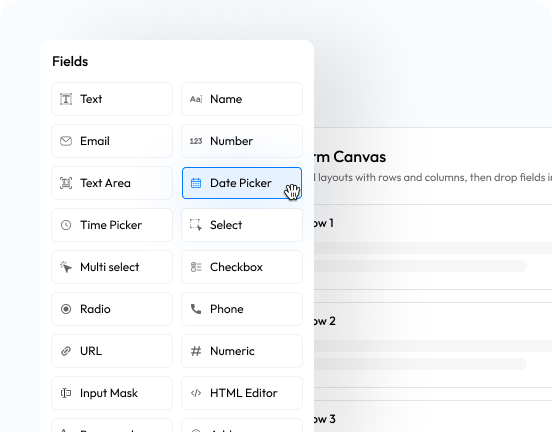
Choose a Trigger Field
Select the field that will control your conditional rule, such as a dropdown, checkbox, radio button, or any supported input field.
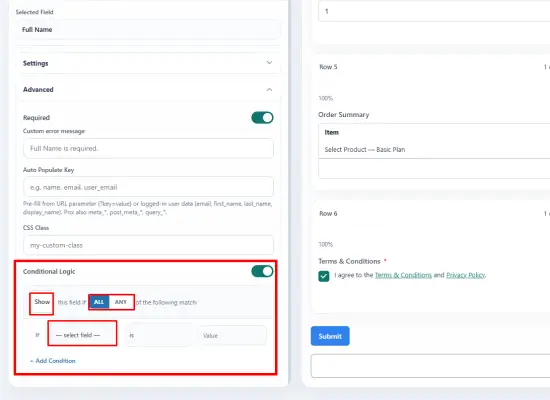
Define the Condition
Choose how the rule should work using operators like Equals, Not Equals, Contains, Greater Than, or other supported conditions.
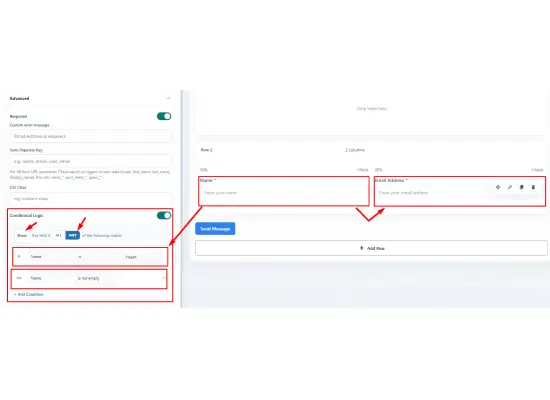
Select an Action
Decide what happens when the condition is met, such as showing a field, hiding a section, or displaying additional options.
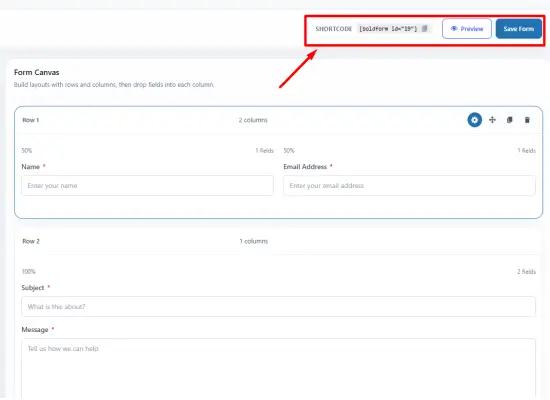
Preview & Publish
Preview your form instantly to ensure every condition works exactly as expected before publishing.
Powerful Smart Conditional Logic Capabilities
Show & Hide Fields
Display only the fields users need based on their previous selections, keeping forms clean and easy to complete.
Conditional Sections
Reveal or hide entire groups of fields using a single condition, making long forms more organized and user-friendly.
Multiple Conditions
Combine multiple rules to create advanced workflows that adapt to complex user interactions.
Smart User Flow
Guide visitors through personalized form paths based on their responses, reducing confusion and unnecessary steps.
Real-Time Updates
Forms update instantly as users interact, creating a seamless and dynamic experience without page reloads.
Flexible Rule Builder
Create and manage conditional rules easily through an intuitive visual interface designed for both beginners and advanced users.
Better Data Collection
Ask only relevant questions to collect cleaner, more accurate, and more meaningful information from every submission.
Works with Every Form
Apply Conditional Logic across contact forms, registration forms, booking forms, surveys, lead generation forms, and more.
Explore More Powerful Features
Drag & Drop Visual Builder
Choose from 60+ ready-to-use customizable input fields.
Form Scheduling
Schedule forms to display them only during selected days and hours.
Fully Responsive
Display all your forms perfectly across various screen sizes.
Payments and Donations
Easily integrate payment gateways for seamless payment and donation forms.
Email Notification
Send instant notifications via email after every form submission.
Connect to CRM
Automate lead generation and lead nurturing with CRM integrations.
Entry Management
View all your leads, payments, and WordPress form data in one place .
Automate Workflows
Create dynamic workflows for user submissions, registrations, data routing, and more.
Form Security
Secure your forms with advanced spam protection, smart permissions, and access control.