🎉 BoldForm Pro Launch Offer: Get Up to 70% OFF — Limited Time Only!

Multi-Step Forms for Better User Experience
Break long forms into simple, easy-to-follow steps that improve user experience, reduce form abandonment, and increase completion rates.
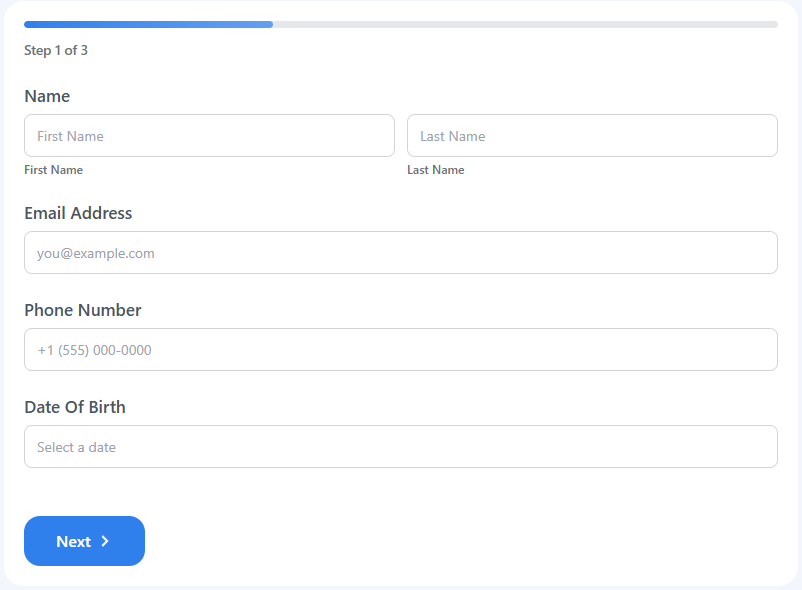
Improve Form Completion with Multi-Step Forms
Better User Experience
Guide users through one step at a time, making forms easier to understand and complete.
No Coding Required
Create professional multi-step forms using an intuitive visual builder without writing a single line of code.
Progress Indicator
Display a clear progress bar so users always know where they are and how many steps remain.
Higher Completion Rates
Reduce form abandonment by breaking complex forms into smaller, manageable sections.
Organize Long Forms into Simple Steps
Turn lengthy forms into clean, structured experiences that are easier to complete. Separate personal information, billing details, file uploads, confirmations, and other sections into individual steps for a smoother workflow.
Guide visitors naturally from one step to the next while keeping forms organized, responsive, and user-friendly across every device.
Build Smart Rules in Four Simple Steps
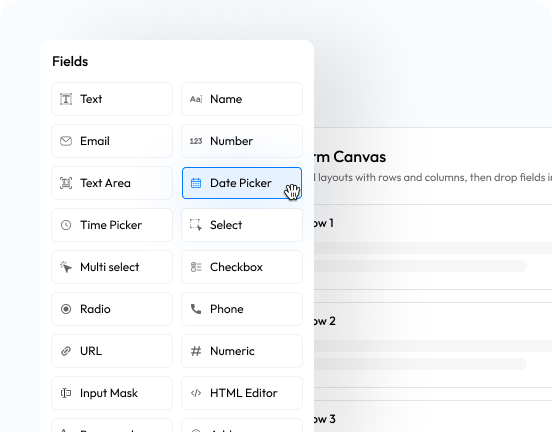
Choose Your Fields
Browse a collection of form fields including Text, Name, Date Picker and more. Simply select the fields you need for your form.

Insert Step Breaks
Divide your form into multiple steps using Step Breaks, creating a smoother and more organized experience for your users.
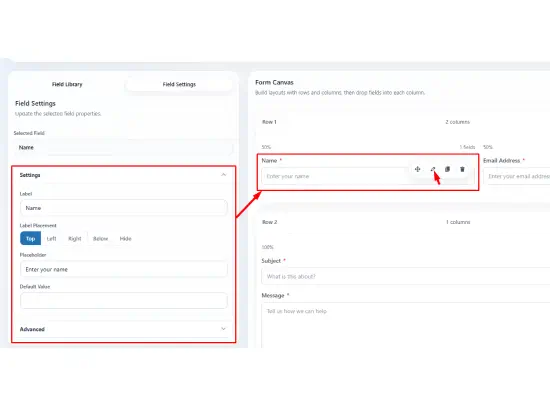
Customize Every Detail
Modify labels, placeholders, required validation and many other options—all from an intuitive settings panel.
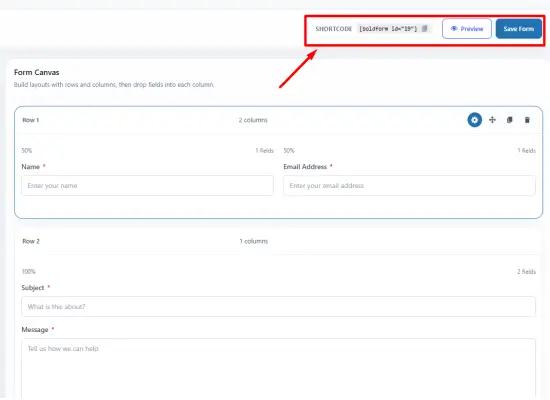
Preview & Publish
Instantly preview your finished form to ensure everything looks perfect before publishing it to your website.
Powerful Features of Multi-Step Form
Flexible Step Navigation
Allow users to move smoothly between steps with intuitive Previous and Next navigation controls.
Progress Tracking
Display progress indicators that help users understand how much of the form has been completed.
Organized Form Sections
Group related fields into logical sections, making even the longest forms easier to complete.
Mobile Friendly
Every multi-step form works seamlessly across desktops, tablets, and smartphones.
Faster Completion
Reduce user fatigue by presenting only a small portion of the form at a time.
Easy Customization
Customize step labels, navigation buttons, and layouts using the visual builder.
Better Data Collection
Collect more accurate information by guiding users through a structured submission process.
Seamless User Experience
Deliver a clean, distraction-free experience that encourages users to complete every step.
Explore More Powerful Features
Drag & Drop Visual Builder
Choose from 60+ ready-to-use customizable input fields.
Form Scheduling
Schedule forms to display them only during selected days and hours.
Fully Responsive
Display all your forms perfectly across various screen sizes.
Payments and Donations
Easily integrate payment gateways for seamless payment and donation forms.
Email Notification
Send instant notifications via email after every form submission.
Connect to CRM
Automate lead generation and lead nurturing with CRM integrations.
Entry Management
View all your leads, payments, and WordPress form data in one place .
Automate Workflows
Create dynamic workflows for user submissions, registrations, data routing, and more.
Form Security
Secure your forms with advanced spam protection, smart permissions, and access control.