
















If you run a hotel, you already know where most of your bookings come from — and how much of each one you hand over to Booking.com or Expedia. Somewhere between 15% and 25% of every reservation, depending on your deal. On a busy month that’s a salary’s worth of money walking out the door, just for the privilege of being listed next to a dozen competitors.
A direct booking website doesn’t replace the OTAs overnight. Nothing does. But every reservation that comes through your own site is one you keep the full value of, plus the guest’s email, plus the chance to bring them back next year without paying a finder’s fee.
The good news is that building that website got a lot easier. You don’t need a developer, a custom-coded reservation engine, or a five-figure budget. With WordPress and a booking plugin, you can have a working system that takes real reservations in an afternoon and a polished one over a weekend.
This is how we’d set it up, using Easy Hotel Booking, the plugin we build and maintain. I’ll be honest about what each step actually involves so you’re not surprised halfway through.
Why bother with a direct booking site at all?
The pitch for OTAs is exposure, and it’s a real benefit — they put you in front of travelers who’ve never heard of you. The problem is the dependency. Your pricing, your guest relationships, your visibility, even your ability to email a past guest, all run through someone else’s platform. Raise your rates and they can bury you in the rankings. A policy change on their end becomes your problem.
Your own site flips that. You set the prices, you run the promotions, you own the guest list, and you keep the commission. It won’t bring you traffic by itself the way an OTA does — you still have to do the work of getting found — but for the guests who already know your name or land on your site from a Google search, there’s no reason to send them through a middleman.
A practical setup uses both: OTAs to reach new travelers, your own site to convert everyone who’s already looking for you specifically.
Why WordPress
WordPress runs a little over 40% of the web, and not by accident. It’s flexible, you can manage it yourself, hosting is cheap, and there’s a plugin for nearly everything. For a hotel that mostly means you’re not locked into a proprietary booking system that charges monthly per room and disappears if the company folds.
The trade-off is that WordPress is a toolkit, not a finished product. You assemble the pieces. A booking plugin is the most important piece — it’s the difference between a pretty brochure site and one that actually takes reservations and money.
That’s the gap Easy Hotel Booking fills: room management, availability, pricing, search, and payments, all inside the WordPress dashboard you already use to write pages and posts.
Step 1: Install the plugin
Install and activate Easy Hotel Booking like any other plugin — upload it, hit activate, done. It adds a new section to your dashboard for rooms, bookings, and settings.
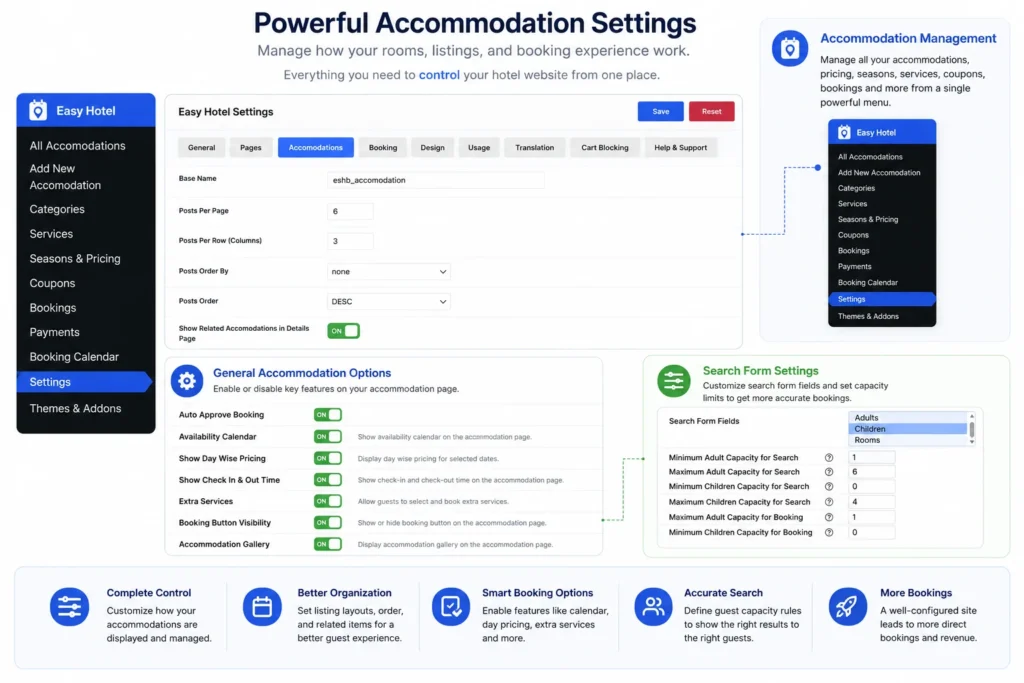
Don’t expect a finished site at this point. What you have is the engine. The next few steps are where you actually build something a guest can use, so set aside a quiet hour or two rather than squeezing it between front-desk shifts.
Step 2: Build out your rooms
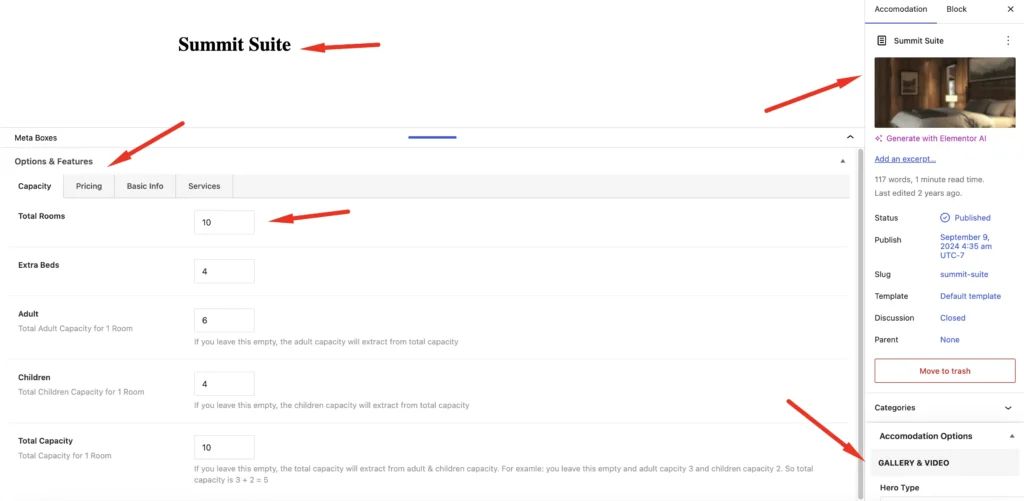
Your rooms are the product, so this is worth doing properly. Create a room type for each category you sell — Standard, Deluxe, that one Ocean View Suite you charge a premium for. There’s no limit, but resist the urge to list every minor variation; guests get decision paralysis when they’re choosing between eleven near-identical options.
For each one, the things that actually move bookings are good photos and an honest description. A few well-lit, recent images beat a dozen blurry phone shots. Write the description like you’re answering the question a guest would email you anyway — bed size, view, whether the bathroom has a tub or just a shower. Then set the occupancy (how many adults and children it sleeps) and tick off the amenities that matter: WiFi, AC, breakfast, parking, pool access. These show up as filters and comparison points, so they’re not just decoration.
Step 3: Keep availability honest
Double bookings are the fastest way to a one-star review, so this part isn’t optional. Easy Hotel Booking only shows guests the rooms that are actually free for their dates, and lets you block out anything that shouldn’t be bookable — maintenance, renovations, holiday closures, a room you’re holding for a returning regular.
If you also sell on OTAs, just keep one source of truth and update it religiously, or you’ll end up overselling the same room on two platforms. (Channel syncing is a bigger topic than this post; for now, discipline covers it.)
Step 4: Set up pricing that isn’t flat
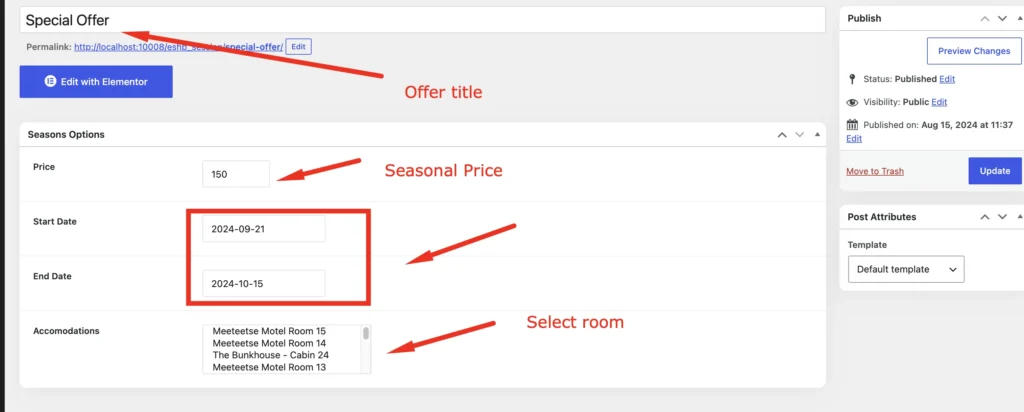
Almost no hotel charges the same rate in February as it does over a holiday weekend, and your site shouldn’t either. Set up seasonal pricing so rates climb automatically during peak periods, festivals, and local events, and ease off in the slow stretches — you shouldn’t be logging in to change prices by hand every few weeks.
Two things worth setting up early: weekly and monthly discounts to nudge longer stays (a guest booking five nights at a small discount is usually better than chasing five separate one-nighters), and a couple of custom rules for whatever’s specific to your property. Get the seasonal rates right first; the rest you can refine once you see how guests actually book.
Step 5: Add the search form

The search form is what turns a visitor into a booking. It lets people pick check-in and check-out dates, set how many adults and children, and see only what’s available. You can drop it anywhere — there are Elementor widgets, Gutenberg blocks, and plain shortcodes — so it works whether you built your site with a page builder or you’re editing blocks by hand.
Put one front and center on your homepage. Burying it three clicks deep is the most common mistake I see on hotel sites.
Step 6: Lay out your rooms so people can browse
How you display rooms changes how people shop. A grid works for most hotels and reads cleanly on mobile. A list layout suits properties where guests are comparing detailed specs. A slider is good for spotlighting a flagship suite, and galleries let the photography do the talking. You don’t need all four — pick what fits your inventory and your design.
Whatever you choose, lead with the photo and the price. That’s the decision most guests are making first.
Step 7: Turn on payments
This is where a brochure site becomes a real booking system. Easy Hotel Booking runs payments through WooCommerce, which means you’ve got access to whatever WooCommerce supports — Stripe, PayPal, cards, bank transfer, and regional gateways depending on where you operate. The guest searches, picks a room, and pays in one flow, with instant confirmation.
Set this up before you go live and then test it with a real card, refunding yourself afterward. A booking form that looks perfect but silently fails at checkout is worse than no form at all, and you’d be amazed how often it goes unnoticed until a guest complains.
Step 8: Use coupons deliberately
Discounts work best when they’re doing a job, not when they’re permanent. Early-bird rates fill rooms during slow forecasts. A holiday code rewards your email list. Percentage or fixed-amount coupons let you run a real campaign instead of quietly cutting your base price forever. Easy Hotel Booking handles all of these — the skill is in when you turn them on, not whether the feature exists.
Step 9: Check it on a phone
Over half of hotel bookings now start on a phone, often a guest lying in bed planning a trip. The plugin’s layouts are responsive, but “responsive” isn’t the same as “good.” Actually book a room on your own phone — tap through the dates, check the photos load, make sure the buttons are thumb-sized and the checkout doesn’t make you pinch-zoom. Fix whatever annoys you, because it’ll annoy guests ten times more.
Step 10: Run the whole thing once, then launch
Before you tell anyone the site is live, book a room yourself from start to finish. Search a date range, pick a room, complete the reservation, pay, and confirm the email actually arrives — both the one to the guest and the one to you. Find the broken thing now, on your own time, not when a paying customer hits it at 11pm.
Once that round-trip works cleanly, you’re done. The site takes bookings around the clock whether you’re at the desk or asleep, and Easy Hotel Booking becomes the place you manage them all from.
What you’re actually getting
Plenty of booking plugins make you stitch together half a dozen add-ons before anything works. The idea behind Easy Hotel Booking is to cover the things a real hotel needs in one place: room management with galleries and capacity rules, an availability calendar that prevents double bookings, seasonal and long-stay pricing, search forms that drop into Elementor or Gutenberg, WooCommerce payments, discount coupons, holiday restrictions, reCAPTCHA on the forms, and a responsive front end.
It’s not trying to be enterprise channel-management software, and it won’t pretend to. What it does is get a small-to-mid-size property taking direct, paid reservations without a developer — which, for most owners, is exactly the bottleneck.
The honest summary: How to build a hotel booking website in WordPress
A direct booking site won’t make the OTAs disappear, and the first weekend of setup is real work. But once it’s running, every reservation that comes through your own site keeps its full value, builds your guest list, and strengthens your brand instead of a third party’s.
Whether you’re running a guest house, a resort, a single vacation rental, or a small chain, the tools to do this are no longer expensive or technical. If you’ve been meaning to stop handing over a quarter of your revenue to platforms that treat your hotel as interchangeable, this is a weekend well spent.
