















Running a hotel without an online booking system means missed reservations and lost guests. Today’s travelers expect to book instantly, anytime, anywhere.
With WordPress and the Easy Hotel Booking plugin, you can create a professional, fully functional booking website in just a few steps, no coding required.
From simple forms to advanced features like seasonal pricing and Airbnb sync, this guide shows you how to build a hotel booking website that drives direct bookings and keeps your business running smoothly.
What You’ll Need
- ✅ A WordPress website
- ✅ Easy Hotel Booking (Free)
- ✅ PRO extensions for advanced features ( Optional )
- ✅ A WooCommerce-compatible theme (or Themewant hotel theme like Luxera or CitySpot)
How to Create a Hotel Booking Website
Here is the step-by-step guide to creating a hotel booking website using a free WordPress hotel booking plugin.
Step 1: Set Up WordPress
- Choose a reliable hosting provider
- Install WordPress
- Pick a hotel-friendly theme (free or premium from ThemeWant)
Step 2: Install the Easy Hotel Booking Plugin
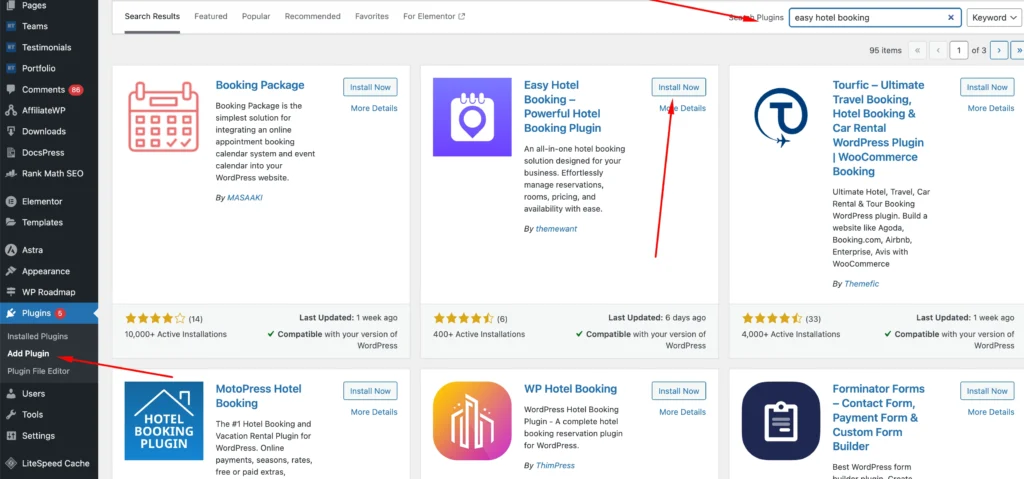
Install from WordPress dashboard:
- Go to Plugins → Add New
- Search for Easy Hotel
- Click Install and then Activate
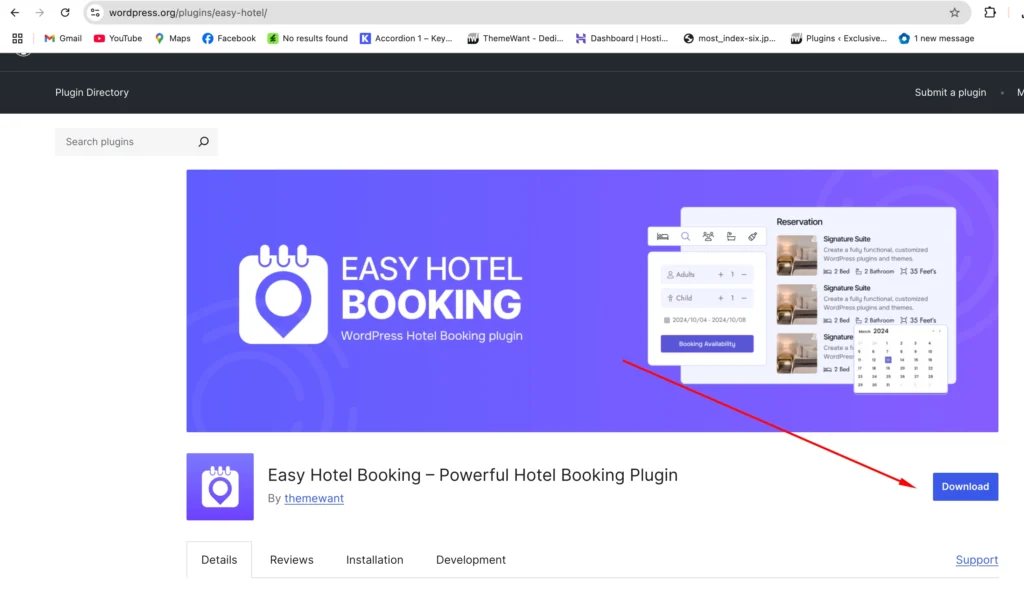
Or download directly from WordPress.org
Step 3: Add Room Types
Go to Easy Hotel → Rooms and create room types like:
- Deluxe Double Room
- Standard Single Room
- Family Suite
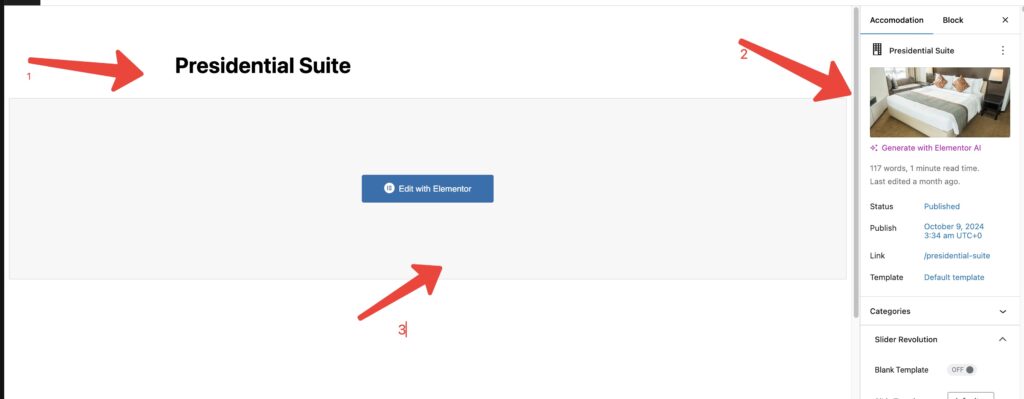
For each room, you can:
- Add room description, images, capacity, and amenities
- Set base price

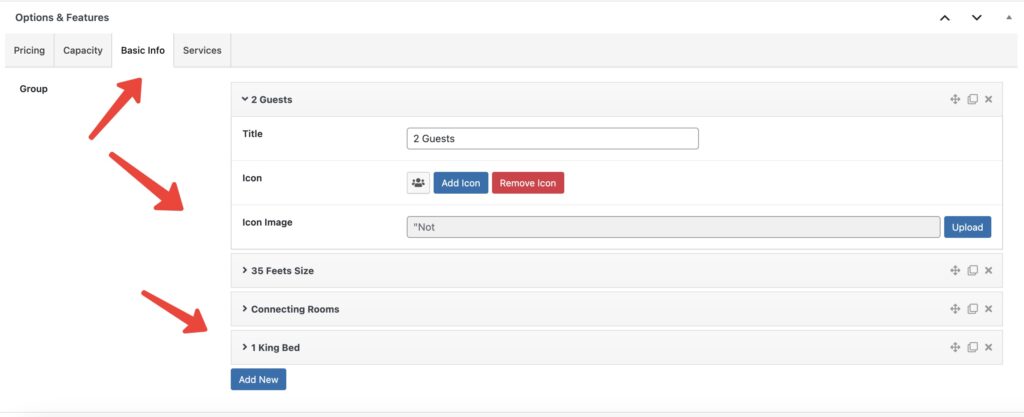
- Add Room Fetaures
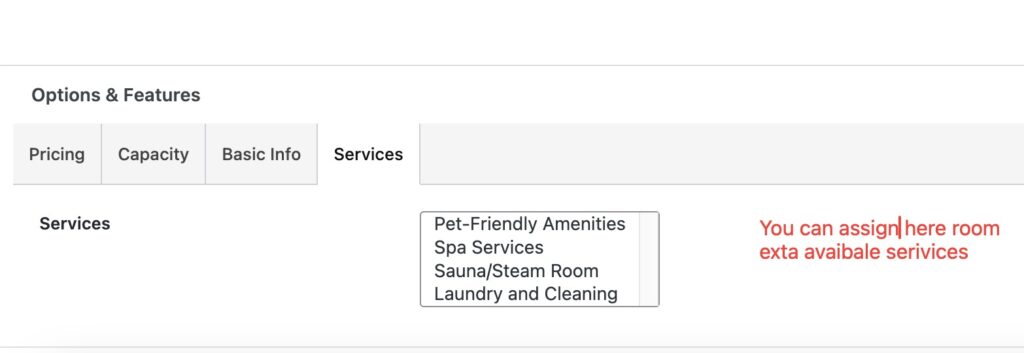
- Add Extra Services
Step 4: Set Base Pricing & Booking Form
The free version includes:
- Calendar-based availability
- Booking form with customer details
- Email notification on successful booking
- WooCommerce integration (for payment)
📌 Use the [eshb_accomodation_grid] shortcode to place the form on any page.
Step 5: Enable WooCommerce for Payments
Install WooCommerce and connect:
- Stripe
- PayPal
- Cash on Delivery (for offline booking)
- Razorpay (if needed)
When users book, the form will redirect them to checkout via WooCommerce.
Congratulations!
You now have a fully working hotel booking website — for FREE! But what if you need more power?
Time to unlock PRO features 👇
Upgrade with Premium Extensions
With Easy Hotel Booking PRO Extensions, you can go beyond the basics.
Here’s what you can add:
1. Min & Max Night Extension
Set the minimum or maximum nights a guest can book.
- Example: Only allow bookings for 2 nights or more
- Great for peak seasons or long-term stays
2. Advanced Pricing with Seasonal Rates
Define custom prices by date range or season:
- Higher prices during holidays
- Discounts during off-peak months
- Different prices for weekends vs weekdays
3. Guest-Based Pricing
Adjust room prices based on:
- Number of adults/children
- Extra guest charges
- Max guest limits
Perfect for family rooms or per-person pricing models.
4. Long Stay Discount
Reward guests who stay longer:
- Stay 7 nights → get 10% off
- Stay 30 nights → get custom price
- Encourages extended bookings
5. Single Day Booking Widget
Enable same-day check-in and check-out:
- Ideal for day-use hotels, co-working spaces, or conference rooms
- Works with your existing booking forms
6. Availability Sync (iCal Integration)
Sync bookings with platforms like:
- Airbnb
- Booking.com
- Google Calendar
Avoid double bookings with automatic iCal sync.
7. Review Extension
Let guests leave reviews for rooms:
- Boost trust and engagement
- Add star ratings and testimonials
More PRO Features (Optional)
- Custom booking form builder
- Coupon and discount system
- Email/SMS notification system
- Guest dashboard
- Multilingual & multicurrency support
- Advanced WooCommerce control
👉 View all premium extensions here: Easy Hotel Booking Extensions
Example Use Case
Let’s say you manage a resort with 3 types of rooms. You want:
- Different prices for weekends
- Discounts for 7+ night stays
- Availability sync with Airbnb
You can:
- Install the free plugin
- Add the rooms and base price
- Install Advanced Pricing, Long Stay, and iCal Sync extensions
- Start accepting payments directly on your site
Final Words
Whether you’re building a hotel, hostel, resort, or vacation rental site, Easy Hotel Booking makes it fast and flexible. Start with the free version, then expand with powerful PRO extensions as your business grows.
